

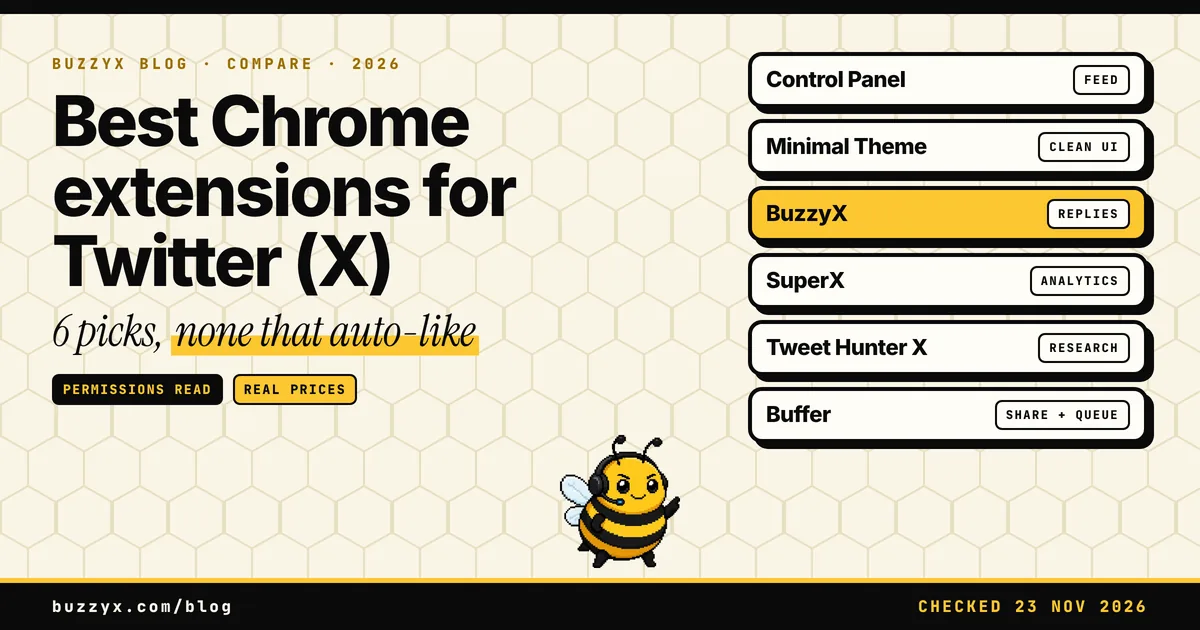
 Six Chrome extensions for X, one job each. Listings and prices checked 23 November 2026.
Search for the best Chrome extensions for Twitter and most of the top results come from companies that sell an X tool and rank their own first. I sell one too, so I won't pretend to be neutral. What I can do is show my work.
So here's my short list. On 23 November 2026 I opened each extension's Chrome Web Store page, wrote down its users and rating, and downloaded the extension itself to read what it asks Chrome for. Six made the cut. One of them is BuzzyX, which I build, and I'll flag it when we get there. The rest I picked because they do one job well and don't touch your account behind your back.
The short list
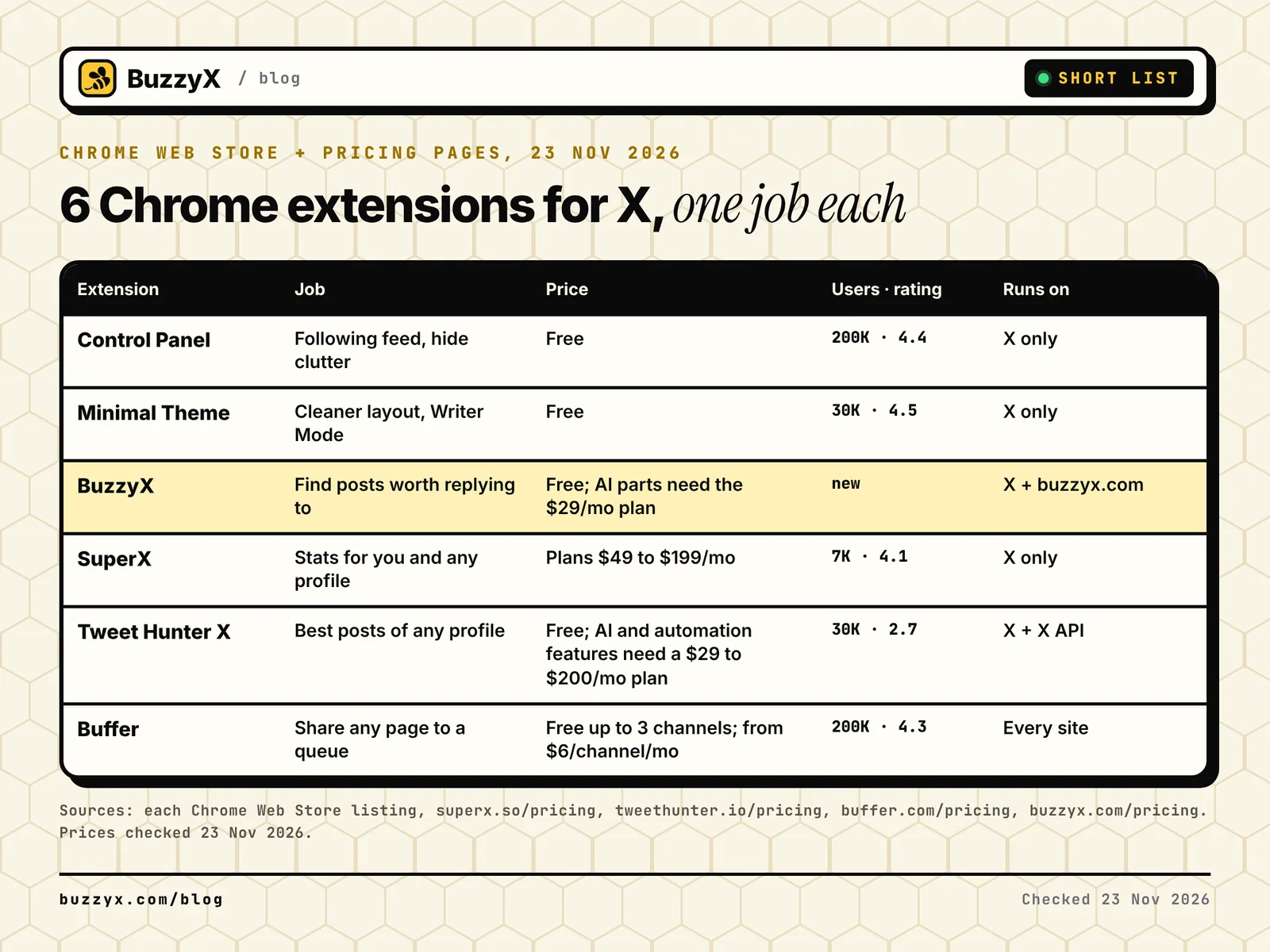 Users and ratings from each Chrome Web Store listing, prices from each pricing page, all checked 23 November 2026.
| Extension | Best for | Price (checked 23 Nov 2026) | Users · rating |
|---|---|---|---|
| Control Panel for Twitter | Following feed, less clutter | Free | 200,000 · 4.4 |
| Minimal Theme for Twitter / X | Cleaner layout, Writer Mode | Free | 30,000 · 4.5 |
| BuzzyX | Finding posts worth replying to | Free; AI parts need the $29/mo plan | New |
| SuperX | Stats on you and any profile | Plans $49 to $199/mo | 7,000 · 4.1 |
| Tweet Hunter X | Best posts of any profile | Free; AI and automation features need a $29 to $200/mo plan | 30,000 · 2.7 |
| Buffer | Sharing any page into a queue | Free up to 3 channels; Essentials from $6/channel/mo | 200,000 · 4.3 |
Every one of these is free to install. Some sell a paid plan behind the extension, and I've put those prices next to each pick. Users and ratings are what the Chrome Web Store showed on 23 November 2026.
How I picked:
- It works on x.com today and got an update in 2026.
- I could read what it asks Chrome for, and that list made sense for what it does.
- It doesn't like, follow, reply or DM for you. More on why in the "skip" section below.
The 6 best Chrome extensions for Twitter, one by one
1. Control Panel for Twitter: get your Following feed back
If you only install one, install this. Control Panel for Twitter keeps your Home timeline on Following, hides the "For you" tab, and lets you switch off trends, view counts, Grok and a long list of other clutter. Its own site lists every option.
Why a founder should care: you grow on X by talking to the people in your niche. The For you tab is great at pulling you into fights you'll never get anything from. Following keeps you with the people you chose.
Price: free to install (checked 23 Nov 2026). 200,000 users and a 4.4 rating from 972 ratings. It only asks for storage, and it only runs on twitter.com and x.com. It was updated on 22 November, the day before I checked.
2. Minimal Theme for Twitter / X: a quieter screen to write in
Minimal Theme is made by the Typefully team. It hides promoted posts, the trends sidebar, view counts and buttons you never press. The nicest touch is Writer Mode, which hides everything except the post box.
It overlaps with Control Panel a bit. Control Panel is about what shows up in your feed. Minimal Theme is about how the page looks. Some people run both.
Price: free to install (checked 23 Nov 2026). 30,000 users and a 4.5 rating from 266 ratings. Storage only, and it only runs on X.
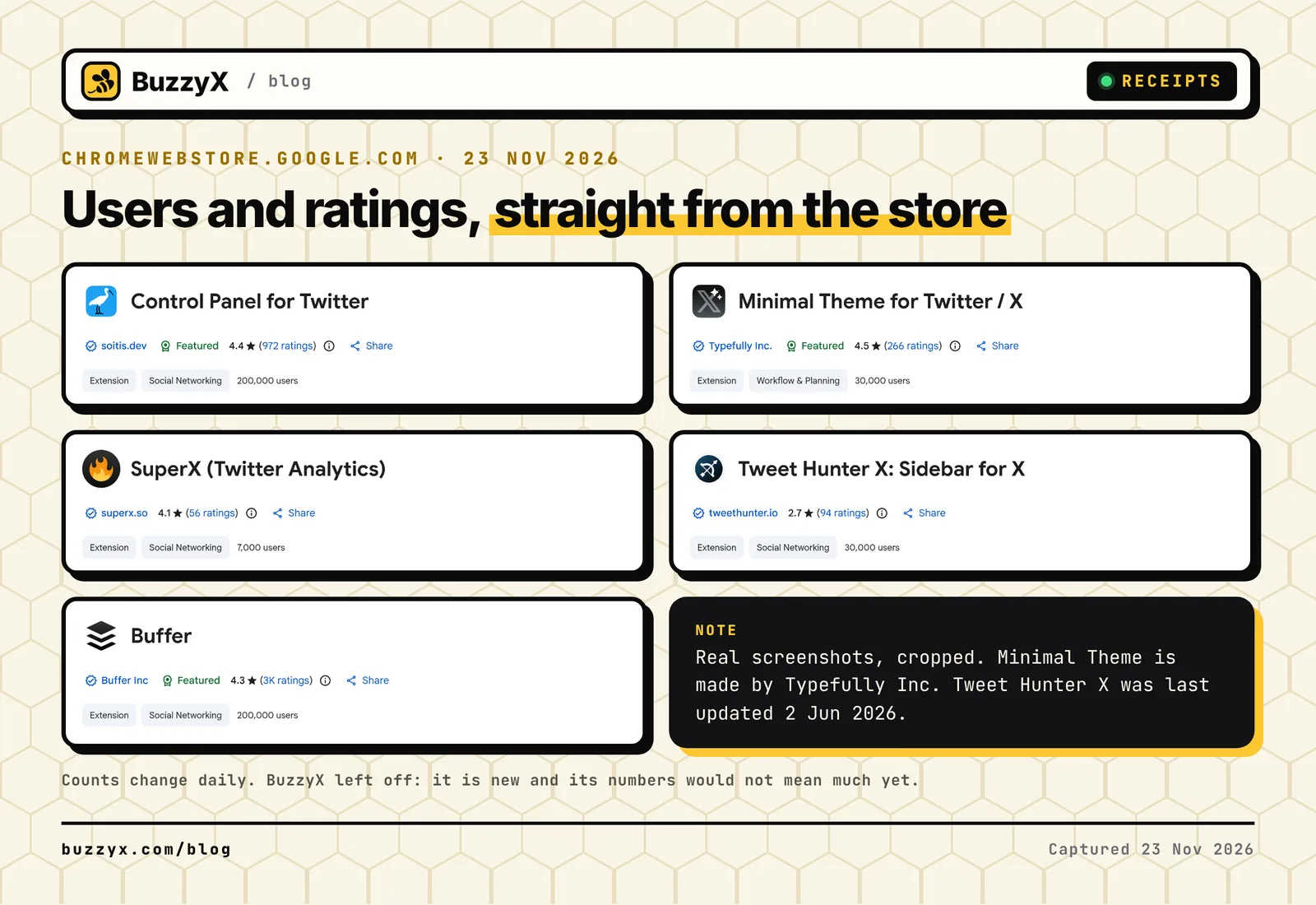 The receipts: real Chrome Web Store screenshots, cropped, 23 November 2026.
3. BuzzyX: find posts worth replying to
This one is mine, so take it with that in mind. Small accounts grow on X through good replies, posted early, on the right posts. I wrote the full method in how to find tweets to reply to. The BuzzyX extension does the finding part while you scroll.
It ranks the posts you pass by how fresh they are, how fast they're picking up likes, and how few replies they have yet. It also shows stats for any profile you open, like typical views, engagement rate and best posts. Those parts work without an account. With a BuzzyX plan you also get reply ideas in your voice, and a BuzzyX button inside X's own post box.
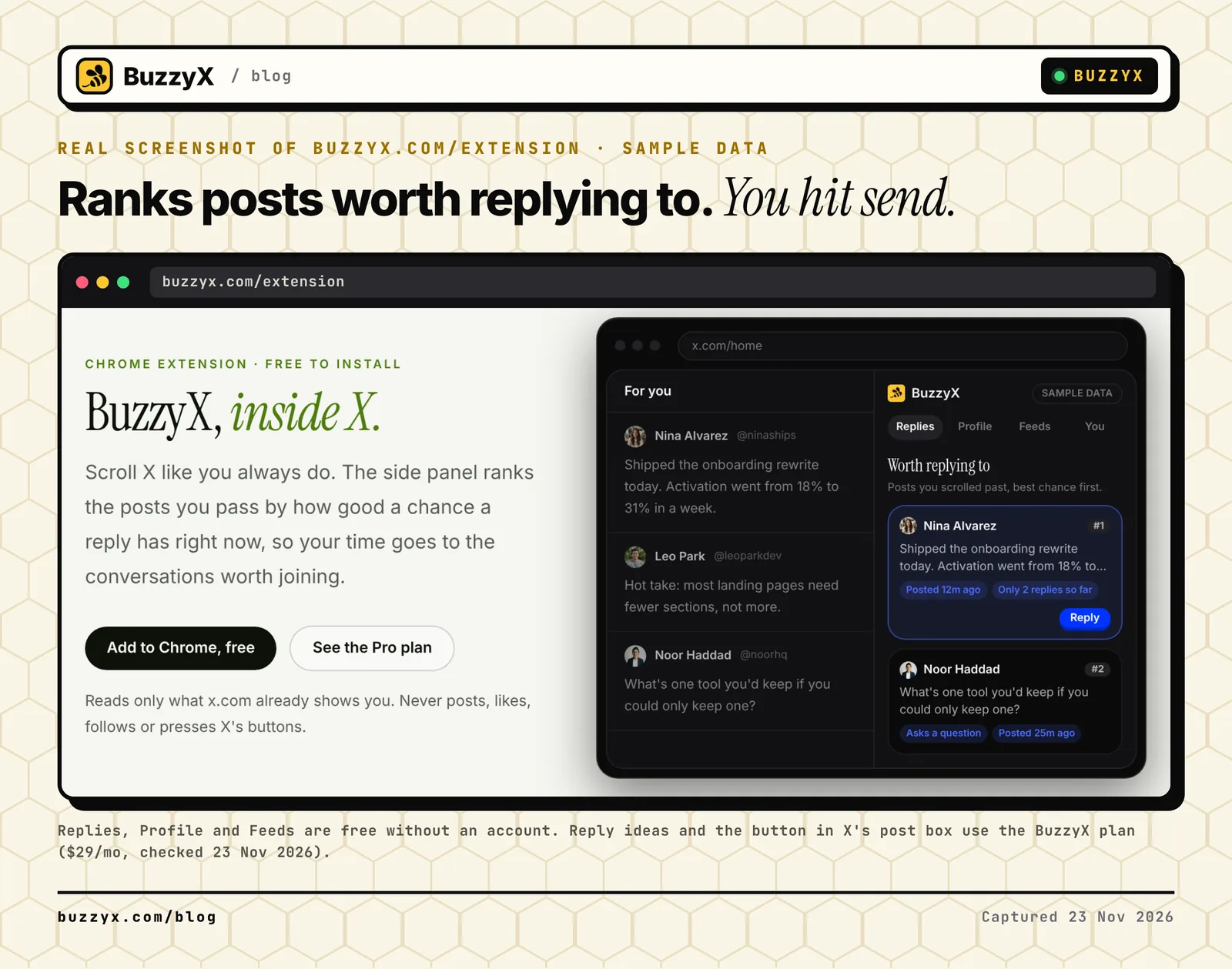 The BuzzyX extension page on buzzyx.com. The posts shown are sample data.
Price: free to install. Reply ideas and the post-box button need BuzzyX at $29 a month (checked 23 Nov 2026). It's brand new, so there's no real user count or rating to show you yet. It asks for storage and the side panel, and runs on x.com and buzzyx.com. It never presses Post, Like or Follow. Reply opens X's reply box with your text, and you send it.
4. SuperX: analytics in a sidebar
SuperX's extension puts a stats panel next to X: your impressions, best and worst posts, follower growth, and the top posts of any profile you visit. It's the most feature-packed extension on this list.
The catch is the price. SuperX's pricing page starts at $49 a month for Pro, Advanced is $49 a month at a launch price (normally $99), and Ultra is $199 a month (all checked 23 Nov 2026). The Chrome Web Store listing doesn't say which sidebar features work without a paid plan. The paid plans also sell auto-DMs, 1,000 a month on Pro and 5,000 on Ultra. That's the web app, not the extension, but it's the same account.
7,000 users and a 4.1 rating from 56 ratings. It asks for no extra permissions and runs on twitter.com, x.com and pro.x.com. If you want to see it next to BuzzyX, I keep a BuzzyX vs SuperX page and a list of SuperX alternatives.
5. Tweet Hunter X: see anyone's best posts
Tweet Hunter X used to be called Twemex. It adds a sidebar with "Recent Hits" from your timeline, the best posts of any profile you open, and your past conversations with someone. That last one is handy before you reply to a person you've talked to before.
The free sidebar is the useful part. The AI features are only for Tweet Hunter subscribers, and Tweet Hunter's plans are $29, $49 and $200 a month (checked 23 Nov 2026). Those same plans also sell auto-DMs and auto-retweet, like SuperX's paid plans. That's the web app, not the sidebar. I compared those plans in Typefully vs Tweet Hunter.
One honest warning: it has a 2.7 rating from 94 ratings, and its last update was 2 June 2026. 30,000 users. It asks for storage plus access to x.com and api.x.com.
6. Buffer: save ideas from anywhere and schedule them
Buffer's extension is the odd one out. It doesn't change X at all. You use it on other sites: see an article worth sharing, click Buffer, and it goes into your queue for X and your other channels.
The extension needs a Buffer account. Price: Buffer's free plan covers up to 3 channels with 10 scheduled posts each. Essentials starts at $6 a month per channel (both checked 23 Nov 2026). 200,000 users and a 4.3 rating from about 3,000 ratings.
It asks for the most: tabs, scripting, context menus and access to every website. That makes sense for a "share this page" button, but it's a lot to grant if you only post to X. If scheduling is all you need, my guide on how to schedule posts on X covers the free way first.
What these extensions can see on your screen
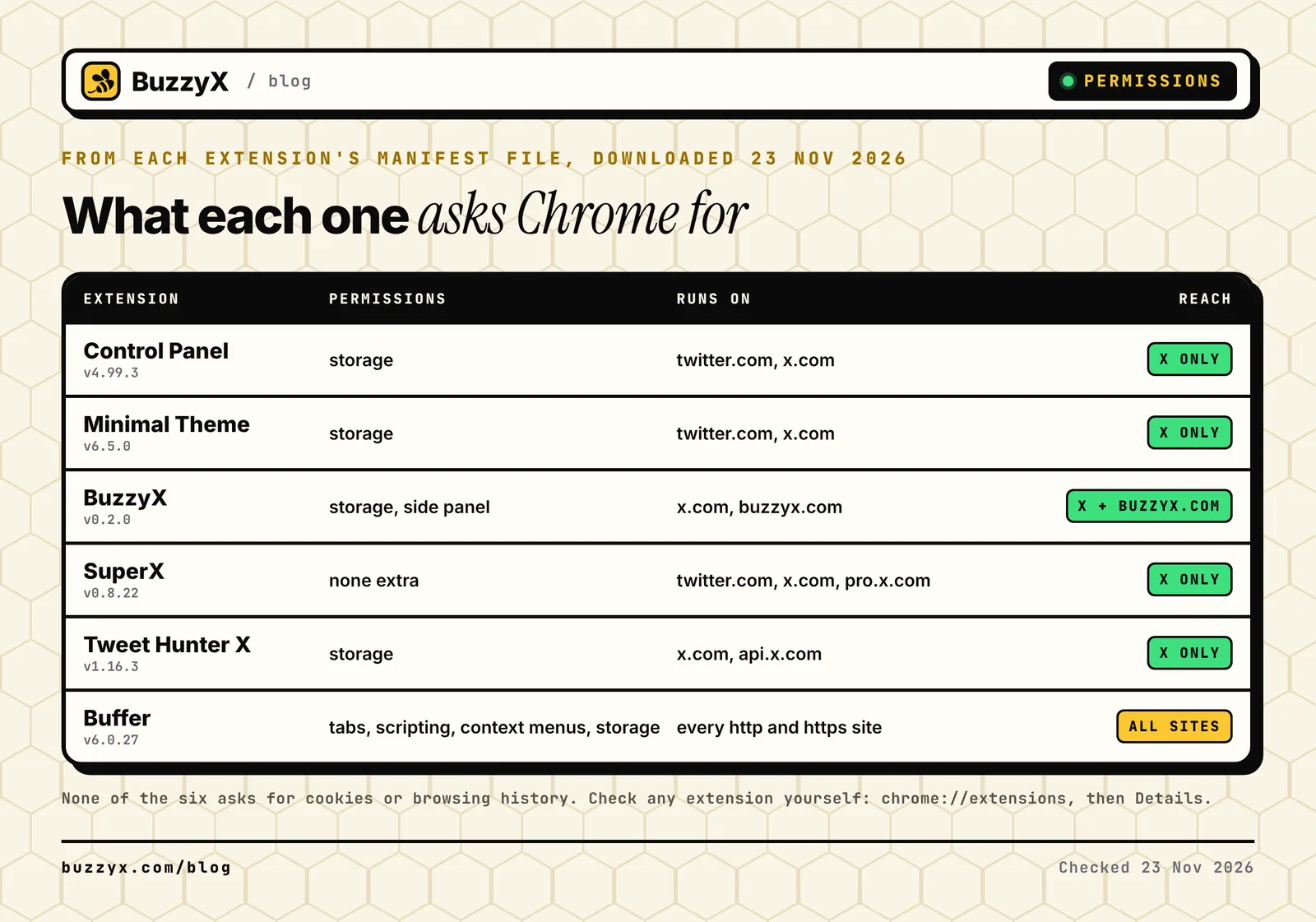 From each extension's manifest file, downloaded 23 November 2026. Versions can change what they ask for.
Every Chrome extension has a file that lists what it's allowed to do. Chrome shows that list when you click Add to Chrome, and later under Details on chrome://extensions. I read all six.
Five of the six only run on X, plus their own site at most. Buffer is the only one that can read every page you open, because sharing any page is its whole job. None of the six asked for your cookies or your browsing history.
My rule: if you can't explain why an extension needs a permission, don't install it. An extension that reads X can see your feed and your DMs page when you open it. That's normal for this kind of tool, so pick makers you'd trust with that.
Which extensions I'd skip
Skip anything that likes, follows, unfollows or replies for you. The store has plenty of these, usually sold as "auto-engage" or "grow followers on autopilot."
X is clear about it. Its automation rules tell developers not to "use non-API-based forms of automation, such as scripting the X website," and say this "may result in the permanent suspension of your account." An extension that clicks buttons on x.com for you is exactly that. The same page says "You may not like posts or hide replies in an automated manner," and bans following or unfollowing "in a bulk, aggressive, or indiscriminate manner."
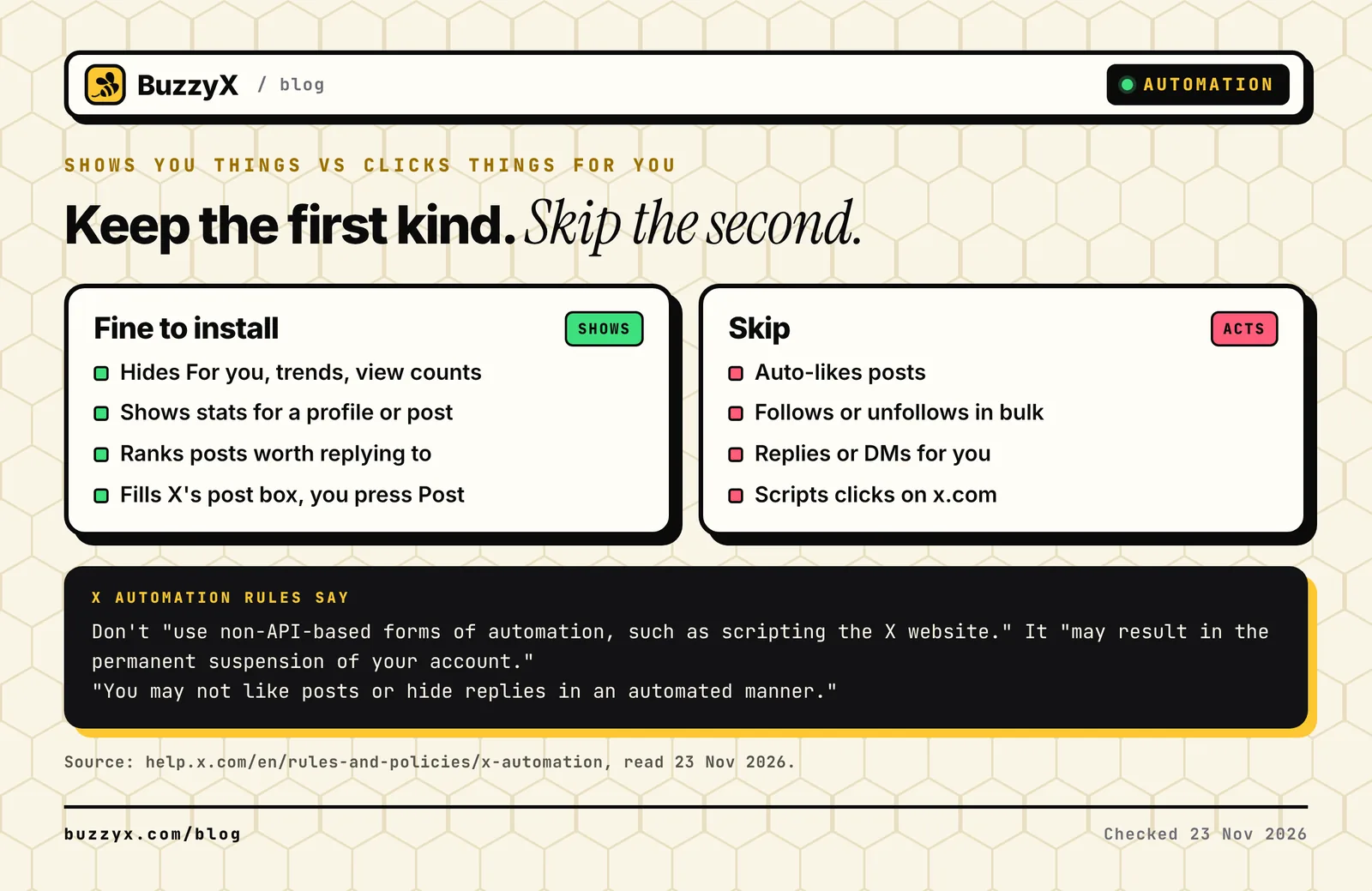 Tools that show you things are fine. Tools that click for you are what X's rules warn about.
The risk sits with you, not the extension. If X limits an account, it's your account. I wrote more about this in why BuzzyX never automates likes, follows, replies or DMs.
Which one to install first
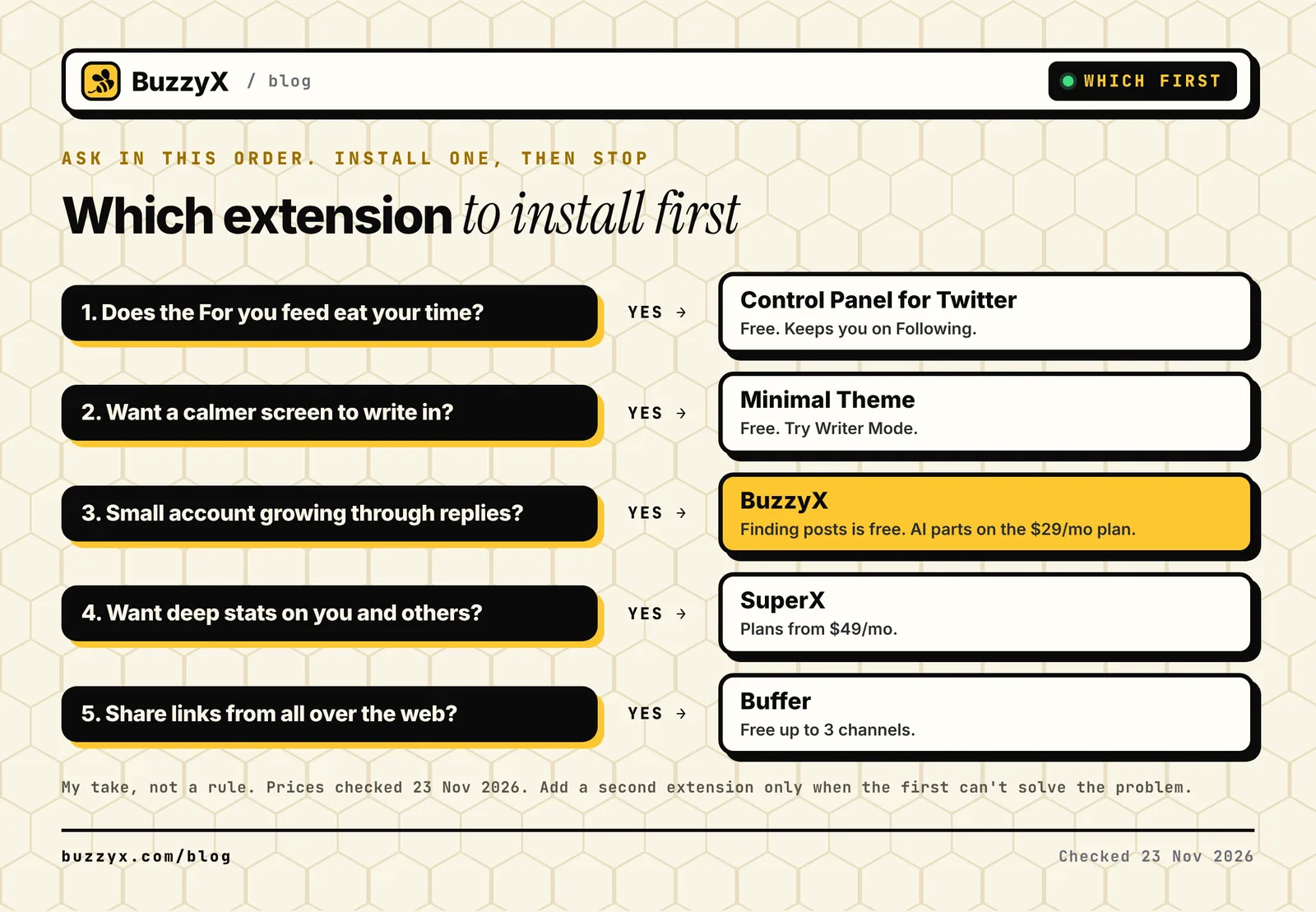 Five questions, in the order I'd ask them. Stop at the first yes.
Here's how I'd decide:
- Distracted by For you? Install Control Panel for Twitter.
- Want a calmer screen to write in? Add Minimal Theme.
- Small account trying to grow through replies? Try the BuzzyX extension. The finding part is free.
- Want deep stats on yourself and others? SuperX, if $49 a month (checked 23 Nov 2026) fits.
- Want to share links from all over the web into a queue? Buffer.
Start with one. It's easy to stack four extensions that all edit the same page and end up with a slow, glitchy x.com. Add the next one only when you hit a problem the first one can't solve.
If you want the whole workspace behind the extension, with an assistant that writes in your voice, a calendar, analytics and Discover, start a 7-day BuzzyX trial. For tools that aren't extensions, see my best X growth tools for founders and the guide to growing on X with replies.
FAQ
Are Chrome extensions for Twitter safe to use?
Most are, if they only change what you see. The risky ones act for you by liking, following or replying, which X's automation rules ban. Check the permission list before you install, and remove anything you don't use.
Can an extension get my X account suspended?
Yes, if it automates actions on the X website. X's automation rules say scripting the website "may result in the permanent suspension of your account." Extensions that only hide things or show stats don't do that.
What is the best free Chrome extension for Twitter?
Control Panel for Twitter, for most people. It's free, it has 200,000 users, and it gives you back the Following timeline. For replies, the free part of the BuzzyX extension ranks posts worth replying to.
Is there a Chrome extension for Twitter analytics?
Yes. SuperX shows your stats and any profile's stats in a sidebar, with paid plans from $49 a month (checked 23 Nov 2026). BuzzyX's extension shows any profile's typical views, likes and engagement rate for free. X's own analytics are explained in my X analytics guide.
BuzzyX · X growth workspace
Grow on X with posts that sound like you.
Compose in your voice, schedule the week, find posts worth replying to and read real analytics from the X API. $29/mo after the trial, everything included.