

 Your old queue isn't coming back on its own. Here's the rebuild.
Hypefury doesn't post to X anymore. If your X queue lived there, nothing in it is going out, and no reconnect will fix that. Today, 9 November 2026, Hypefury's own homepage lists the platforms it posts to as Instagram, Facebook Pages, Threads, LinkedIn, TikTok and Bluesky. X isn't on it.
Plenty of sites already have a "Hypefury alternatives" list. We do too: Hypefury alternatives for X. This post is the other half. It's how I'd actually move a posting setup off Hypefury in one evening: get the posts out, throw most of them away, rebuild a queue you can keep, and replace the autoplugs and auto retweets with small habits. No automation.
What actually changed at Hypefury
I couldn't find an announcement, a changelog entry or a blog post from Hypefury about leaving X. What I could find is its own pricing page, saved by the Wayback Machine.
On 14 June 2026, the FAQ asked "Does Hypefury still support 𝕏/Twitter?" and answered "Yes". The Starter plan was $29 a month with "6 social (1 𝕏) accounts". On 14 July 2026, the same question had a new answer: "Nope! Hypefury no longer supports 𝕏 :(". So the switch happened somewhere in those four weeks.
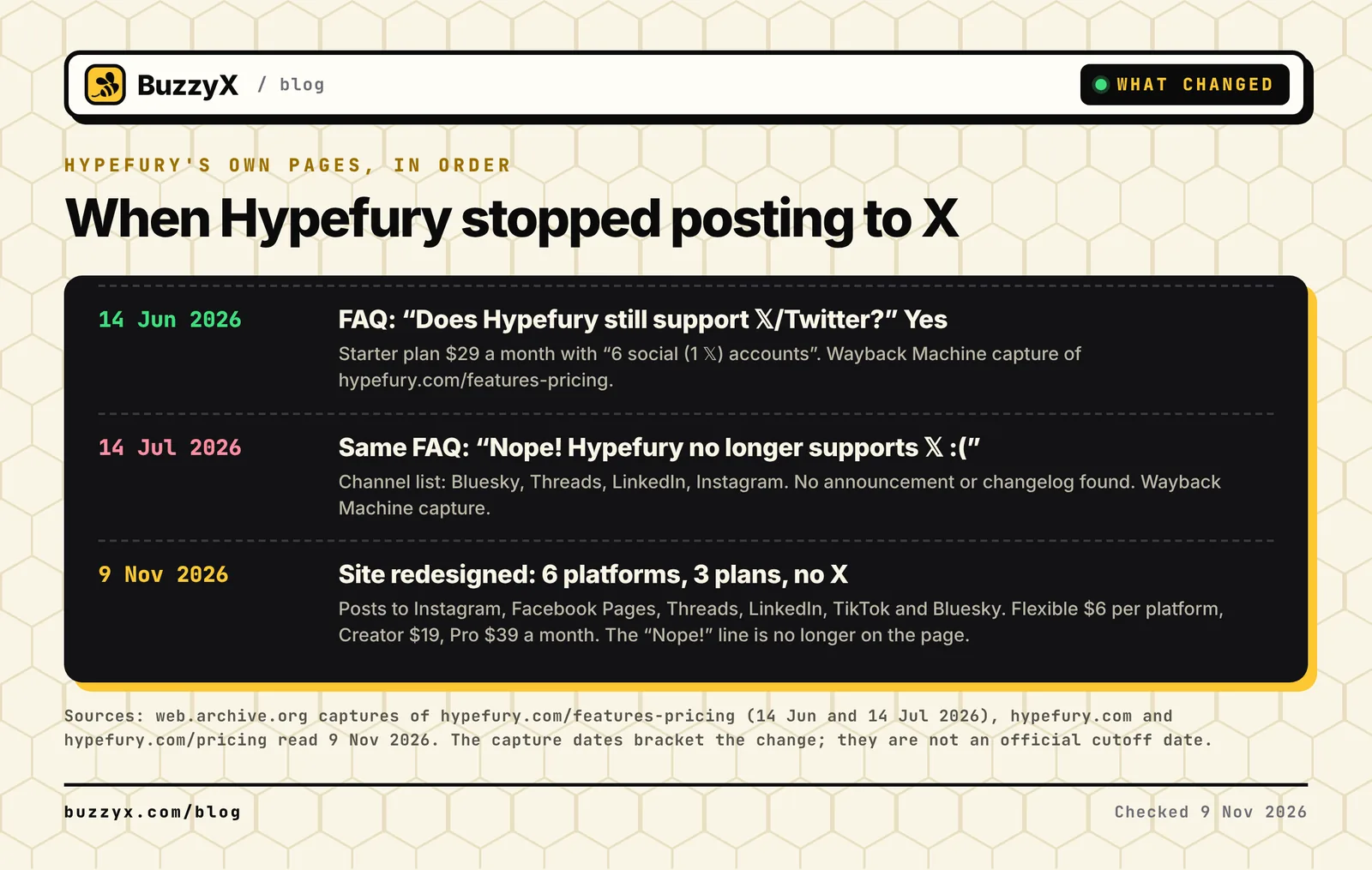 What Hypefury's own pages said, in order. Dates are Wayback Machine captures, not an official cutoff.
Then the site changed again. The current pricing page is "6 platforms. 3 plans. 1 app.": Flexible at $6 a month per platform, Creator at $19 a month and Pro at $39 a month. The "Nope!" line isn't there anymore, so a lot of articles are quoting text you can't find on the live page. The platform list is the clearer answer now, and X isn't in it.
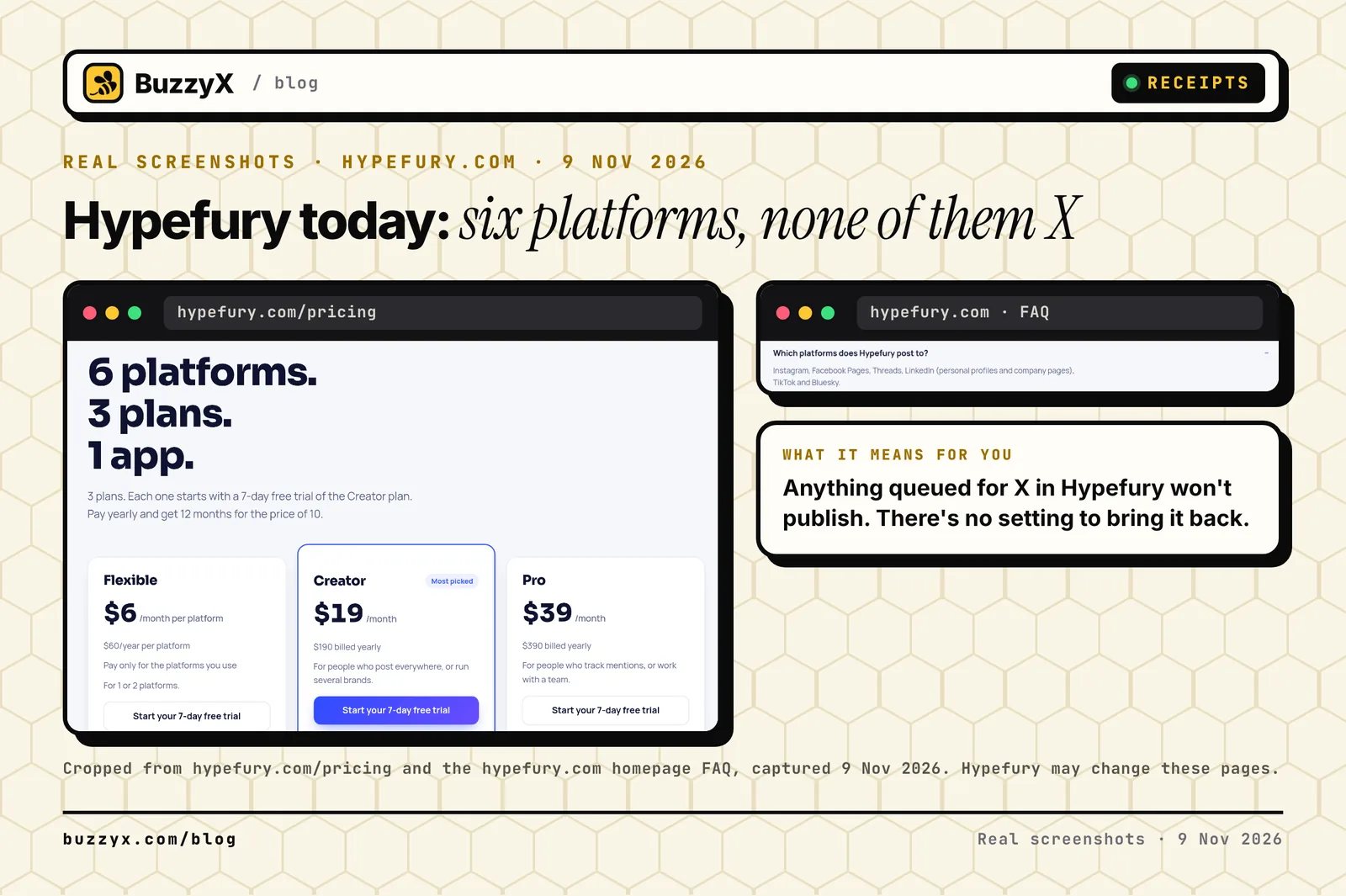 Hypefury's live pricing page and homepage FAQ, captured 9 November 2026.
Hypefury hasn't said why, as far as I can tell, so I won't guess. I'll just say that posting through the X API is billed per request now, which I broke down in what the X API costs per call. Every X scheduler pays that bill somehow.
Step 1: Get your posts out before you cancel
I looked through Hypefury's help center for an export. It has articles for uploading a CSV and for uploading your Twitter archive, both to get posts in. I didn't find one for getting your queue out. So plan on copying by hand.
Open a spreadsheet with five columns: the post text, the type (queue, evergreen or draft), the old slot time, any images, and a keep column you fill in later. Paste every post you'd be sad to lose. It's boring. It takes maybe an hour if your evergreen list is big.
While you're at it, request your X archive. On X's help page the path on mobile is Settings and privacy, then Account, then Your X data, then Request data. X says it "may take a few days", so do it tonight. The archive has your posts as HTML and JSON files, which is the best source for finding your real winners, not just the ones you once marked as evergreen.
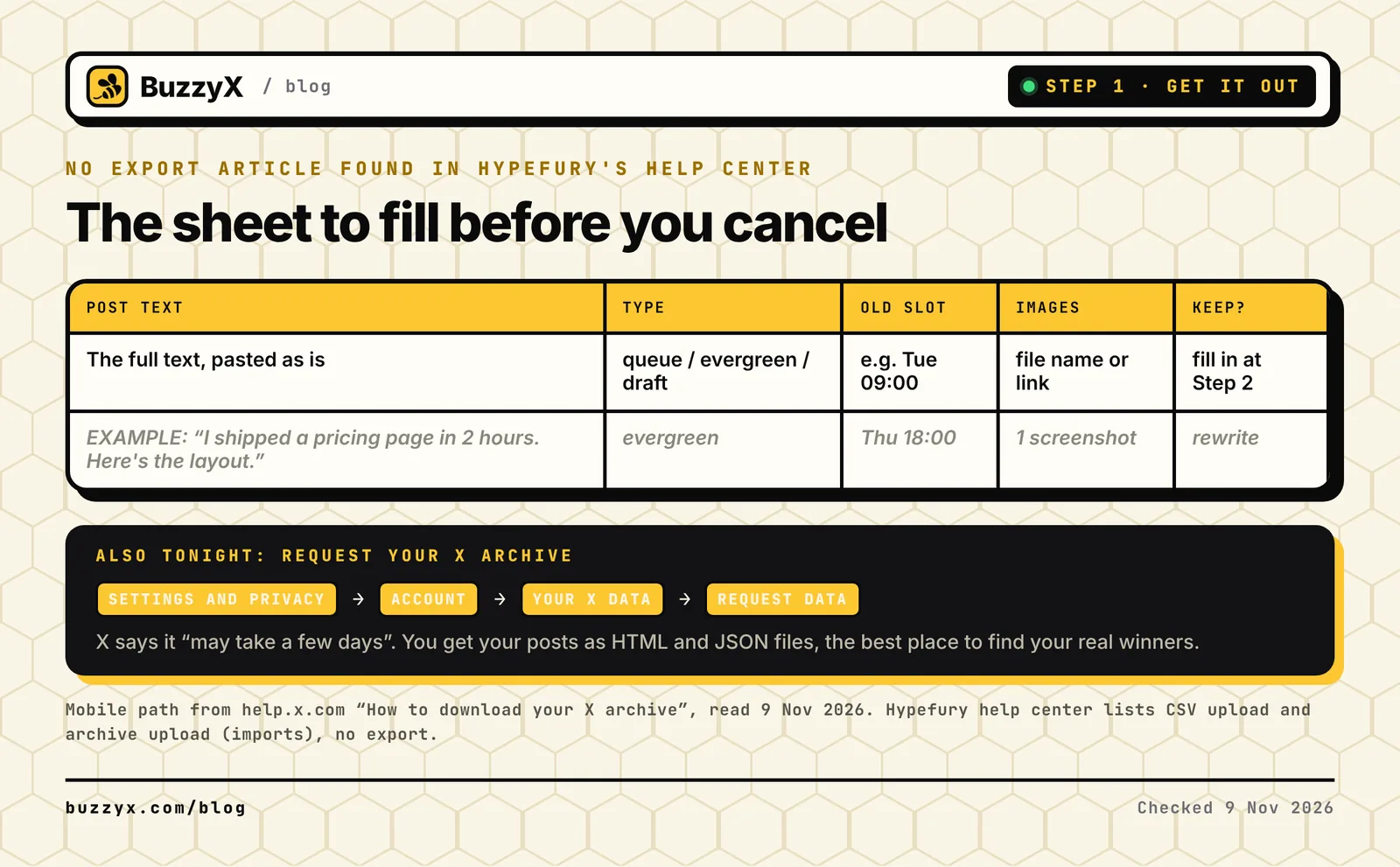 The sheet I'd make before touching anything else.
Don't cancel yet if you also post to LinkedIn, Threads or Instagram through Hypefury. Those still work there. If X was the only reason you paid, cancel from the Billing page. Its help article says cancelling takes effect at the end of the current billing period.
Step 2: Triage: keep, rewrite or kill
Most queues are full of stuff that was true six months ago. Launch posts for a launch that already happened. Numbers that changed. Takes you don't hold anymore. Moving tools is the cheapest moment to clean that out.
I'd ask three questions of each row. Is it still true? Kill it if not. Is it tied to a date? Kill it, or rewrite it as a lesson. Did it do well before? That's an evergreen candidate, but it gets a rewrite, not a copy and paste.
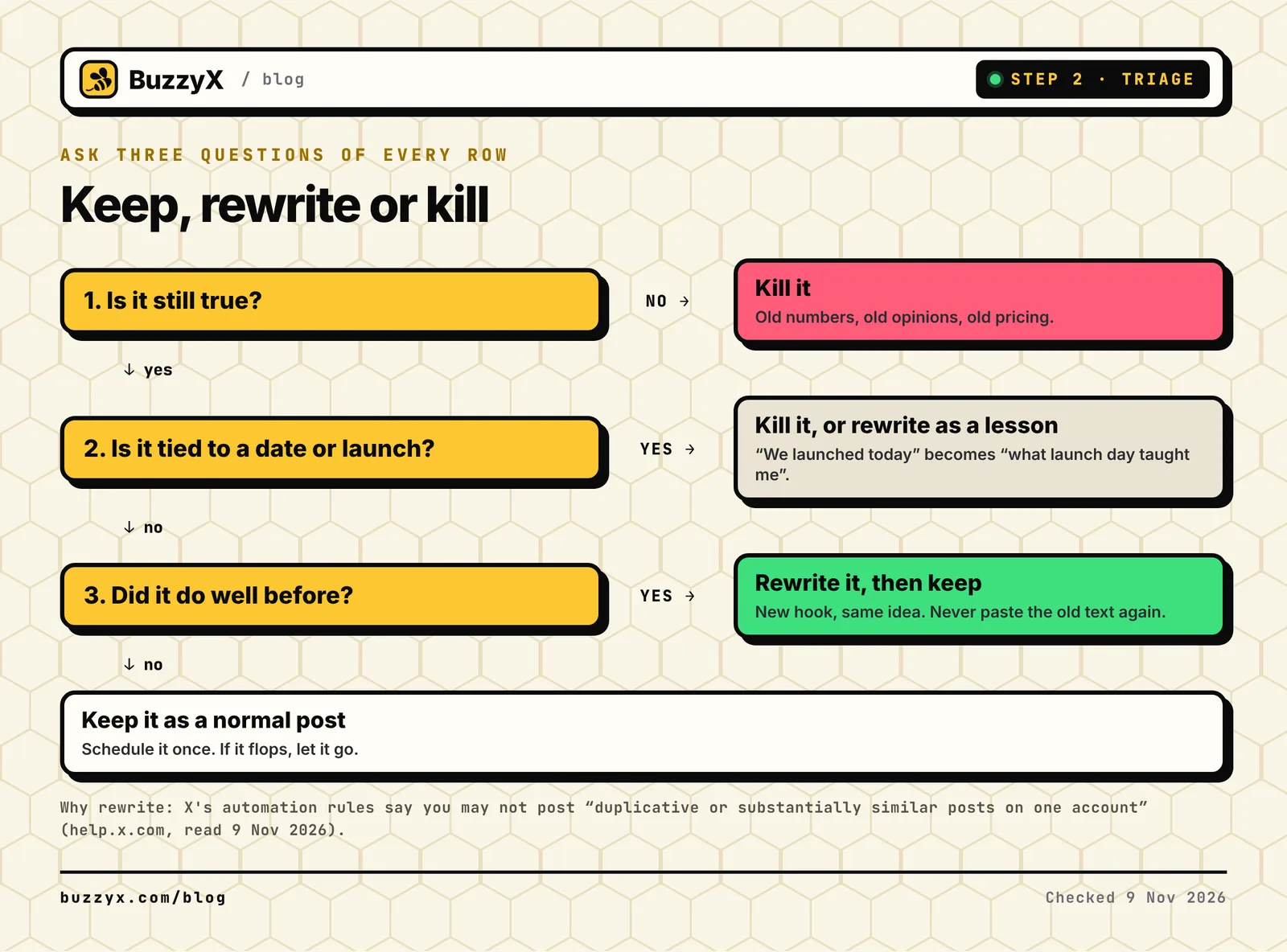 Three questions per post. Most rows end up in "kill", and that's fine.
The rewrite part matters. Hypefury's evergreen feature reposted your evergreen list on a schedule, capped at once a week per post. Pasting the same text again by hand isn't much better. X's automation rules say you may not post "duplicative or substantially similar posts on one account". So take the idea, write a new hook, and add whatever you learned since.
Step 3: Rebuild the queue around a week you can keep
Don't rebuild your old schedule just because it existed. Pick the number of posts you can write every week without hating it. If you're under 500 followers, my guide on how often to post on X says one post a day or every other day, plus replies, is plenty. It goes deeper on time budgets, and finding your best time to post shows how to pick slots from your own numbers.
Then load the week. In BuzzyX that's the Schedule page: paste a post, add up to 4 images if it had any, pick a date and time or click a day on the calendar. Up to 100 posts can wait in the queue, and they publish from our servers, so your laptop can be closed. You can cancel any post until the moment it goes out.
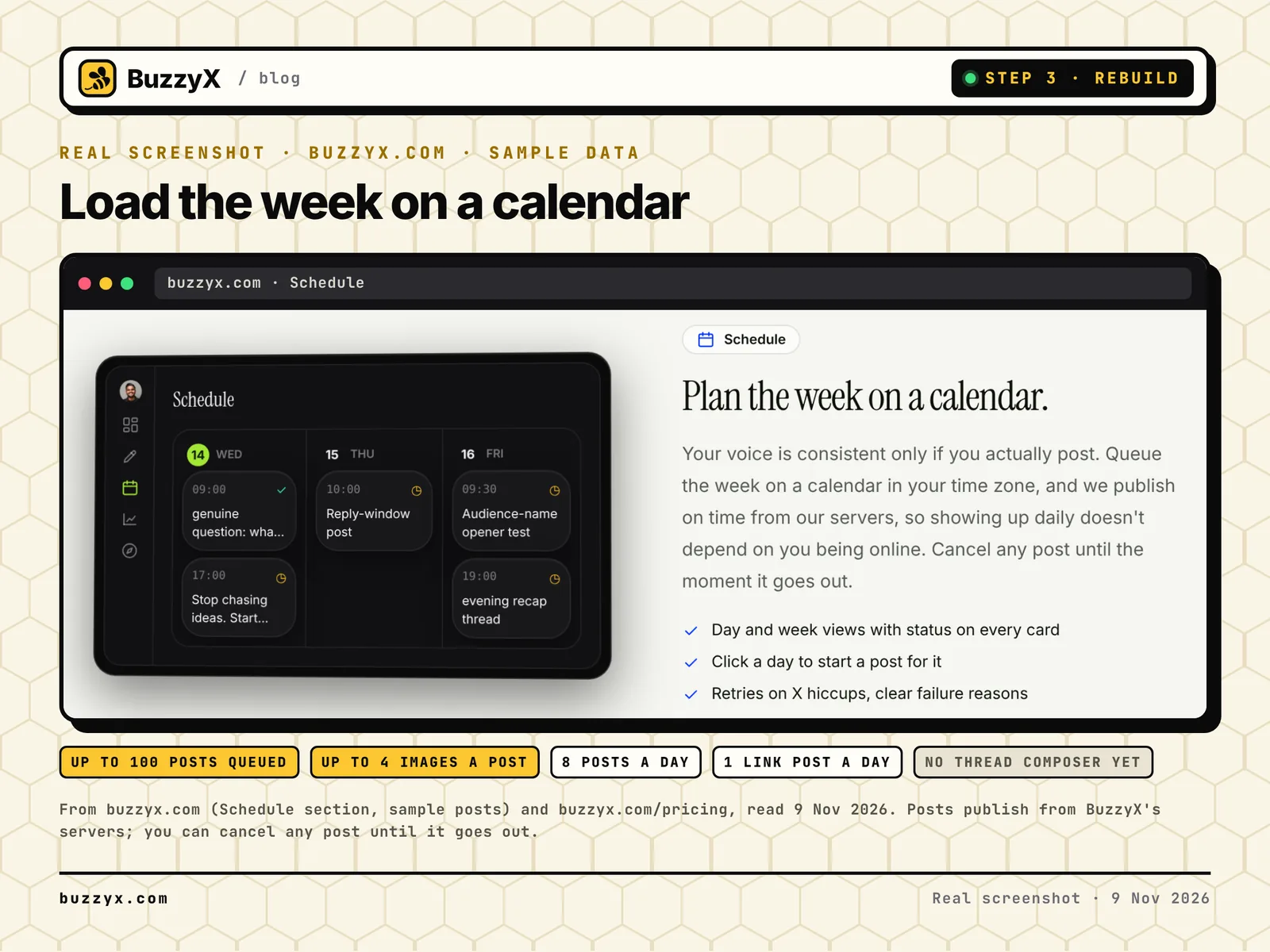 BuzzyX's Schedule view as shown on buzzyx.com. The posts in it are sample data.
Two honest limits. The plan allows up to 8 posts a day and one post with a link a day, because X charges a lot more for link posts. And there's no thread composer yet. If your Hypefury queue was mostly threads, BuzzyX isn't the right home for them today, and the alternatives page has tools that do threads.
Step 4: Replace the automations with habits
This is where I disagree with most migration guides. They tell you to find a tool that turns autoplug, auto retweet and evergreen back on. I'd let them go.
Hypefury's autoplug added a follow-up reply once a post hit an engagement level. Its Tweet Booster retweeted posts that crossed a threshold. Both are useful. Both also make your account feel like a vending machine when people see the same plug under every post.
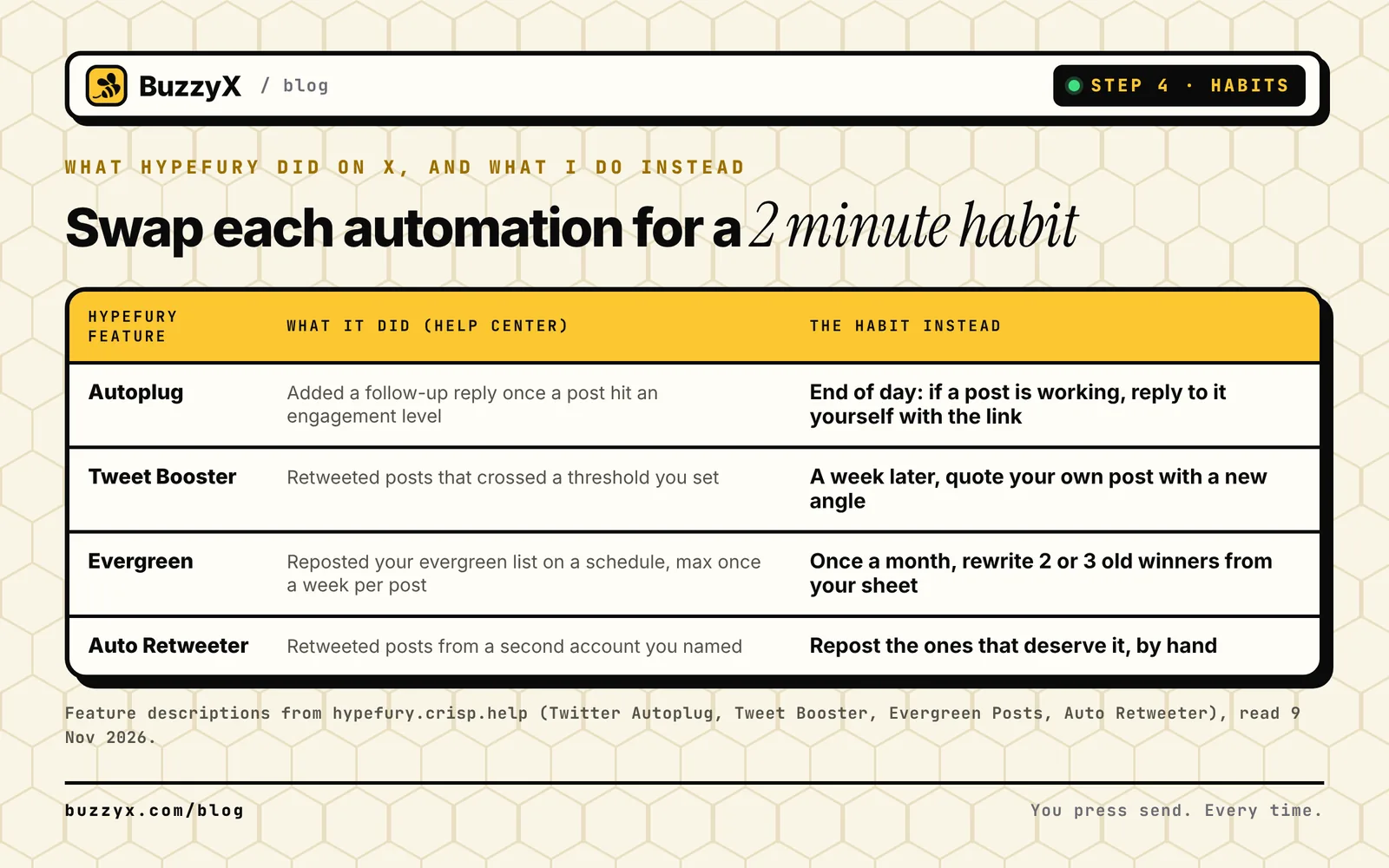 Each automation, and the two minute habit I'd use instead.
Here's what I do instead. At the end of the day I open my posts. If one is clearly working, I reply to it myself with the link or the next thought. If a post from last week deserves a second shot, I quote it with a new angle instead of reposting it. And once a month I go back to the archive sheet and rewrite two or three old winners.
It's slower. It also means every reply under my posts is one I meant. X's rules call bulk or aggressive automated reposting a violation, and I'd rather not build a habit that sits near that line. I wrote more about this in why BuzzyX never automates likes, follows, replies or DMs.
Step 5: Switch over in one week
Here's the order I'd follow, and what I'd check before calling it done.
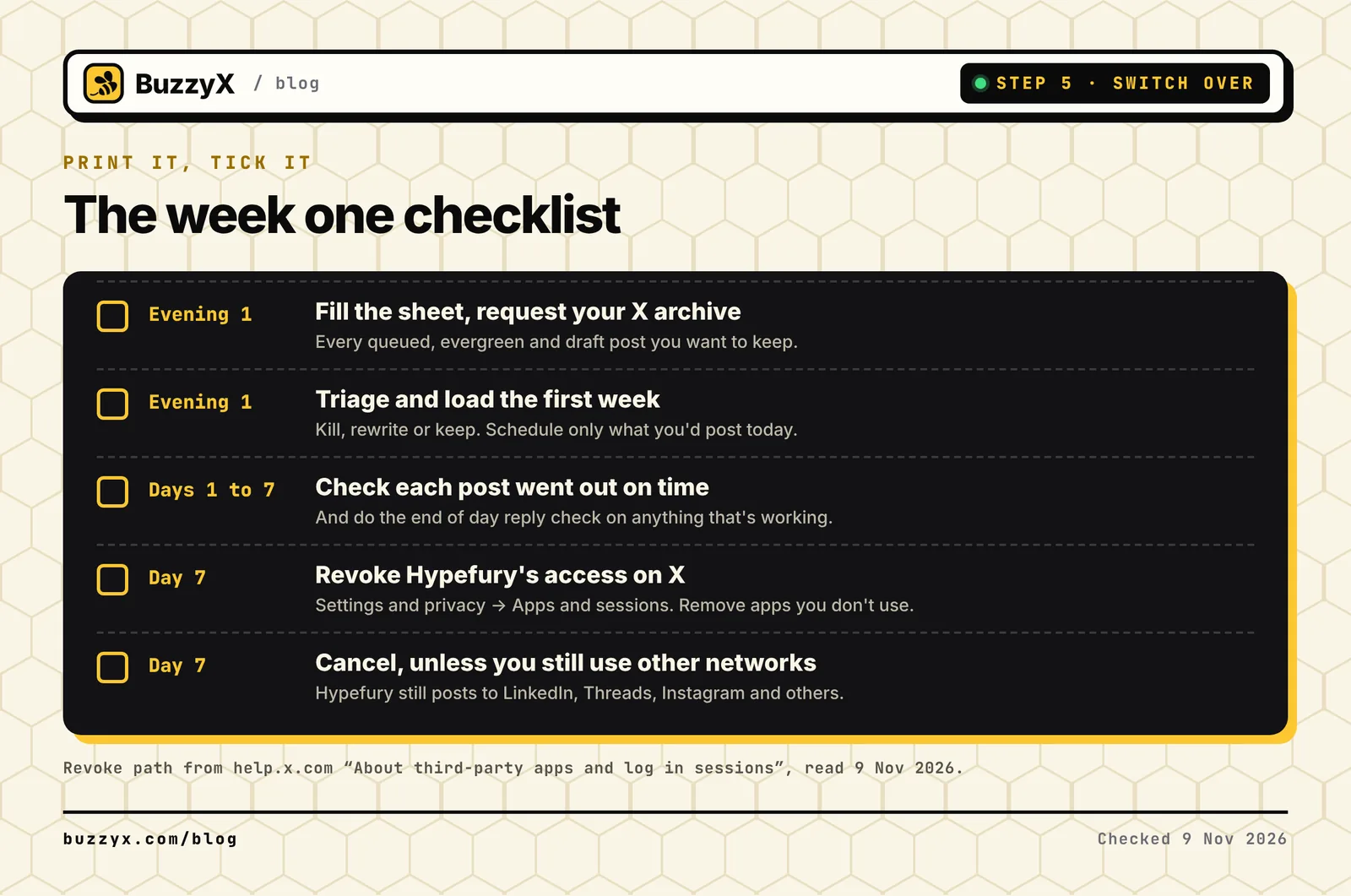 The week one checklist. Print it, tick it.
Run the first week on the new calendar and watch it. Check each post went out at the right time. Then revoke Hypefury's access to your X account. X's help page on third-party apps says you review and remove them in the Apps and sessions section of Settings and privacy. An app you don't use shouldn't keep write access to your account.
Where to rebuild
If you want autoplugs and auto retweets back, BuzzyX isn't that tool, on purpose. Look at the Hypefury alternatives for X list, which covers what each one automates.
If you want an X-only workspace where nothing posts unless you wrote it, BuzzyX is $29 a month: an assistant that writes in your voice, the scheduling calendar, analytics from the X API and Discover for finding posts worth replying to. The side by side is on BuzzyX vs Hypefury. The free Chrome extension finds posts worth replying to right on x.com, and you still press send.
Start your 7-day BuzzyX trial and load your first week tonight. Or grab the free Chrome extension first.
FAQ
Does Hypefury still support X?
No. Hypefury's homepage lists Instagram, Facebook Pages, Threads, LinkedIn, TikTok and Bluesky as the platforms it posts to. X isn't one of them.
When did Hypefury stop supporting X?
Hypefury hasn't published a date that I could find. Its pricing page said "Yes" on 14 June 2026 and "Nope! Hypefury no longer supports 𝕏" on 14 July 2026, according to Wayback Machine captures.
Can I export my Hypefury queue?
I couldn't find an export article in Hypefury's help center, only imports. Copy your queue, evergreen list and drafts into a spreadsheet, and request your X archive for the posts you already published.
BuzzyX · X growth workspace
Grow on X with posts that sound like you.
Compose in your voice, schedule the week, find posts worth replying to and read real analytics from the X API. $29/mo after the trial, everything included.